BEFORE
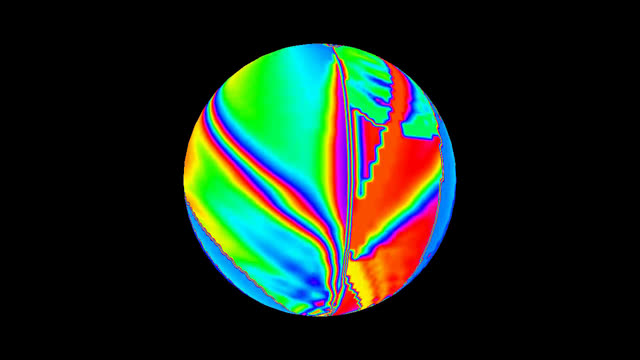
AFTER
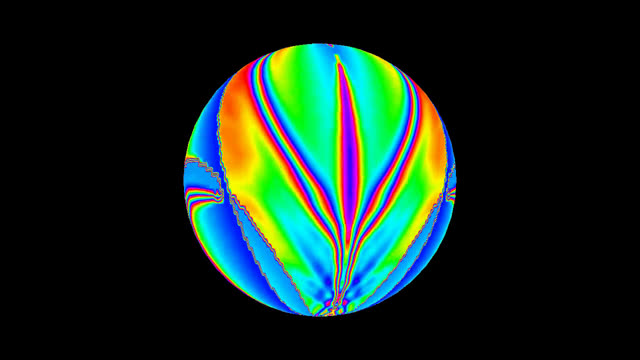
After fixing the depth-buffer tearing on ShoggothOx's curved 3D display modes, one artifact remained: a razor-sharp line running pole to pole down the sphere, and a matching hard edge running the length of the ring's tube. Unlike the depth bug, this one isn't a mistake in the rendering pipeline — it's a mathematical inevitability of wrapping a picture that doesn't tile around a surface that does. This post is about that seam: why it must exist, the classic ways to hide it, and the two-line fix we chose — with a small detour through the mathematics of reflections.
ShoggothOx's 3D modes drape the live 160×100 simulation buffer over
meshes — a sphere, a torus, a cylinder, a coiled ring — using
ordinary UV texture mapping. Each mesh vertex specifies a coordinate pair
(u, v) into the buffer, and for a closed surface like a
sphere, u maps continuously from 0 to 1 across the periodic
boundary where the start and end coordinates meet.
That "arrive back where you started" is the problem. The point at
longitude 0 and the point at longitude 360° are the same point on the sphere, but they sample different columns of the buffer:
column 0 on one side, column 159 on the other. Our buffer is a live
cellular-automata simulation — flames, waves, and particle trails
— and nothing in it forces the left edge to match the right edge.
Formally, a texture wraps seamlessly in u only if it is
periodic: T(0, v) = T(1, v) for every v. Ours isn't, so the wrap point shows a step discontinuity — a
sharp visual seam where the unrelated simulation states from the left and
right borders of the buffer collide.
It's worth stressing that the seam is not a bug in the sampler, the mesh, or the shader. Any method that wraps a non-periodic image around a closed curve has to reconcile the two ends somewhere. The only question is how gracefully.
There are four standard escapes, each with a cost:
We chose the mirror. Here's the math that makes it work.
In GPU graphics, texture coordinates u are normalized
floating-point numbers spanning the range [0.0, 1.0]. When a
coordinate falls outside this range, the GPU sampler resolves it using an
address mode.
The standard mode is Repeat, which resolves the coordinate by
taking its fractional part (mathematically, a floating-point modulo 1.0,
or u - floor(u)):
repeat(u) = u mod 1.0
The mode we want is MirrorRepeat, which folds the coordinate
using a triangle wave of period 2.0 (taking the floating-point modulo
2.0):
mirror(u) = 1.0 - | 1.0 - (u mod 2.0) |
Under mirror, as u runs 0 → 1 → 2, the
sampled position runs 0 → 1 → 0: forward, then backward. Two
properties do all the work:
T(u) represent the color of the texture at normalized
coordinate u, and let ε be a tiny
positive value representing a minuscule step away from the boundary.
u → 1−) samples the texture at T(1 − ε).
u → 1+) samples
T(mirror(1 + ε)). Composing the math step-by-step:
(1.0 + ε) mod 2.0 = 1.0 + ε
1.0 − (1.0 + ε) = −ε
|−ε| = ε
1.0 − ε
mirror(1 + ε) = 1 − ε, which
samples the exact same texel T(1 − ε). No
constraint on the texture is needed to maintain perfect continuity.
u → 2−) samples T(mirror(2 − ε)).
Composing:
(2.0 − ε) mod 2.0
= 2.0 − ε
1.0 − (2.0 − ε)
= −1.0 + ε
|−1.0 + ε| = 1.0 − ε
1.0 − (1.0 − ε) = ε
mirror(2 − ε) = ε. Approaching
0 from the right (u → 0+) samples T(mirror(ε)), which evaluates directly to
T(ε). Both sides sample the same point, ensuring
seamless tiling.
In other words, mirror(u) is an even, 2-periodic
function, and composing any texture with it yields a texture that is
automatically continuous on the circle — for any input
image.[1]
There's one more subtlety: GPU texture filtering
(specifically, bilinear filtering). When a coordinate lands between texel grid
points, the GPU "filters" the image by interpolating (blending) the colors
of the four nearest texels to keep the scaling smooth.
Under MirrorRepeat, even at the exact fold and wrap points,
bilinear filtering blends a texel with its reflected twin — which is
identical — meaning it never invents new colors. Under plain Repeat, however, the hardware filter at the wrap boundary tries to
blend the rightmost column 159 with the leftmost column 0. This produces a
one-texel stripe of interpolated colors that exist nowhere in the actual
scene — creating the thin, artificial purple seam line visible in
the "before" videos.
Being precise about what the mirror buys: the composed texture is C⁰ continuous (values match) but not C¹ (the gradient flips direction at the fold). On smooth color ramps that shows up as a faint crease — you can spot one running along the ring in the "after" shot below — but a crease in an otherwise-continuous gradient is a world away from a step between unrelated colors. The eye forgives a fold; it fixates on a tear.
The implementation is two small changes. First, closed mesh directions now
span uv ∈ [0, 2] instead of [0, 1], so one
trip around the surface is one full forward-and-back traversal of the
texture:
// Shared mesh generator
pub fn make_sphere() -> (Vec<Vertex>, Vec<u16>) {
    // ...
    verts.push(Vertex {
        pos: [sin_p * cos_t * 0.9, cos_p * 0.9, sin_p * sin_t * 0.9],
        uv: [uu * 2.0, vv],       // was [uu, vv]
    });
    // ...
}
Second, the samplers switch from Repeat to
MirrorRepeat:
let sampler_linear = device.create_sampler(
    &wgpu::SamplerDescriptor {
    mag_filter: wgpu::FilterMode::Linear,
    min_filter: wgpu::FilterMode::Linear,
    address_mode_u: wgpu::AddressMode::MirrorRepeat,   // was Repeat
    address_mode_v: wgpu::AddressMode::MirrorRepeat,
    ..Default::default()
});
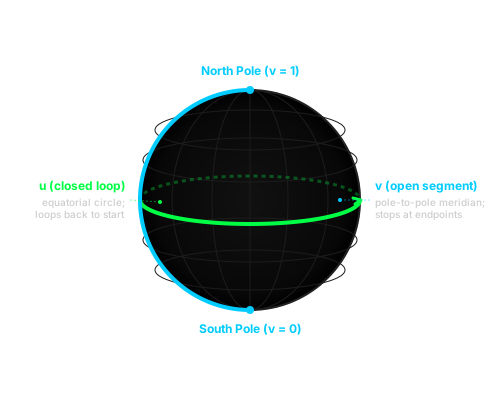
Which directions get doubled depends on the topology of each mesh:
u (circumference) is a topologically closed loop —
doubled because traveling around it returns to the start. In contrast,
v is an open segment with distinct endpoints (pole to pole,
or end to end). Because v stops at the boundary (e.g., the
poles) and never wraps back to meet itself, it has no seam. A sphere's
coordinate space cannot be closed in both directions without wrapping
over itself (as a sphere is not topologically equivalent to a torus).
Thus, v remains open and unchanged.
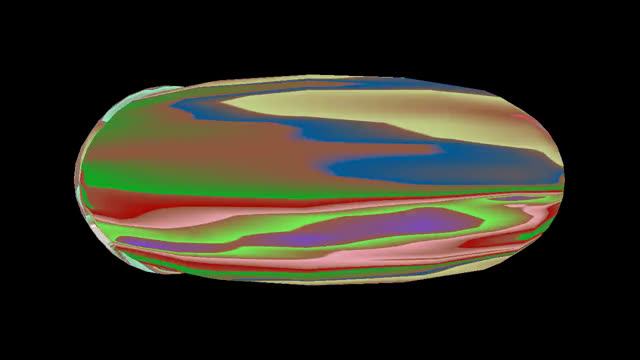
v)
is closed — doubled. Its u runs along the coil, which
is an open spiral (the ends never meet), so it stays as-is.
v coordinate tiles the buffer three times and used to show
a seam line rushing toward the camera once per tile — mirrored
tiling removes those too.
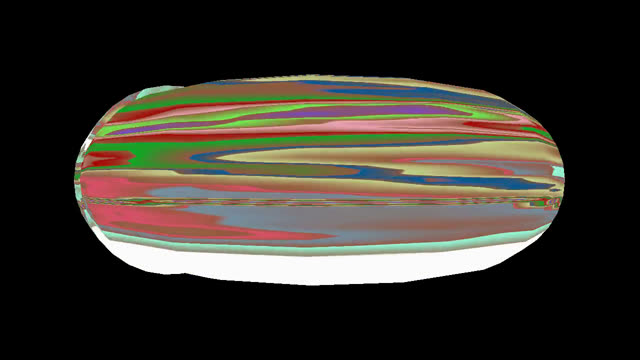
Mirroring is not free — it changes what you see. The buffer now appears twice around each closed direction, once forward and once reflected, so every feature gains a mirror twin and the surface acquires a bilateral symmetry it didn't have before. You can see it in the "after" shots: the pattern on the sphere's left half is the reflection of its right half. (A related consequence: each buffer column now spans half the angular width it used to, so at any given moment a different slice of the simulation faces the camera than before the fix — the same movie, projected differently.)
For a music visualizer we'd argue this is a feature, not a concession. Kaleidoscopic symmetry is a staple of the genre (MilkDrop presets impose fourfold and sixfold symmetries on purpose, precisely because reflections read as intentional design), and symmetric patterns are far easier on the eye than a hard discontinuity, which feels like a rendering error. There is also a subtler perceptual win: the seam used to rotate with the object, periodically sweeping across the visible face like a glitchy meridian; the symmetry, by contrast, is stable and calm.
If we ever want seamlessness without symmetry, the principled path is option one from the list above — make the simulation itself periodic (a toroidal cellular-automata world), which is on our longer-term research list alongside other topology experiments. But that is a change to the simulation's physics; today's fix is purely optical.